When can you take it again?
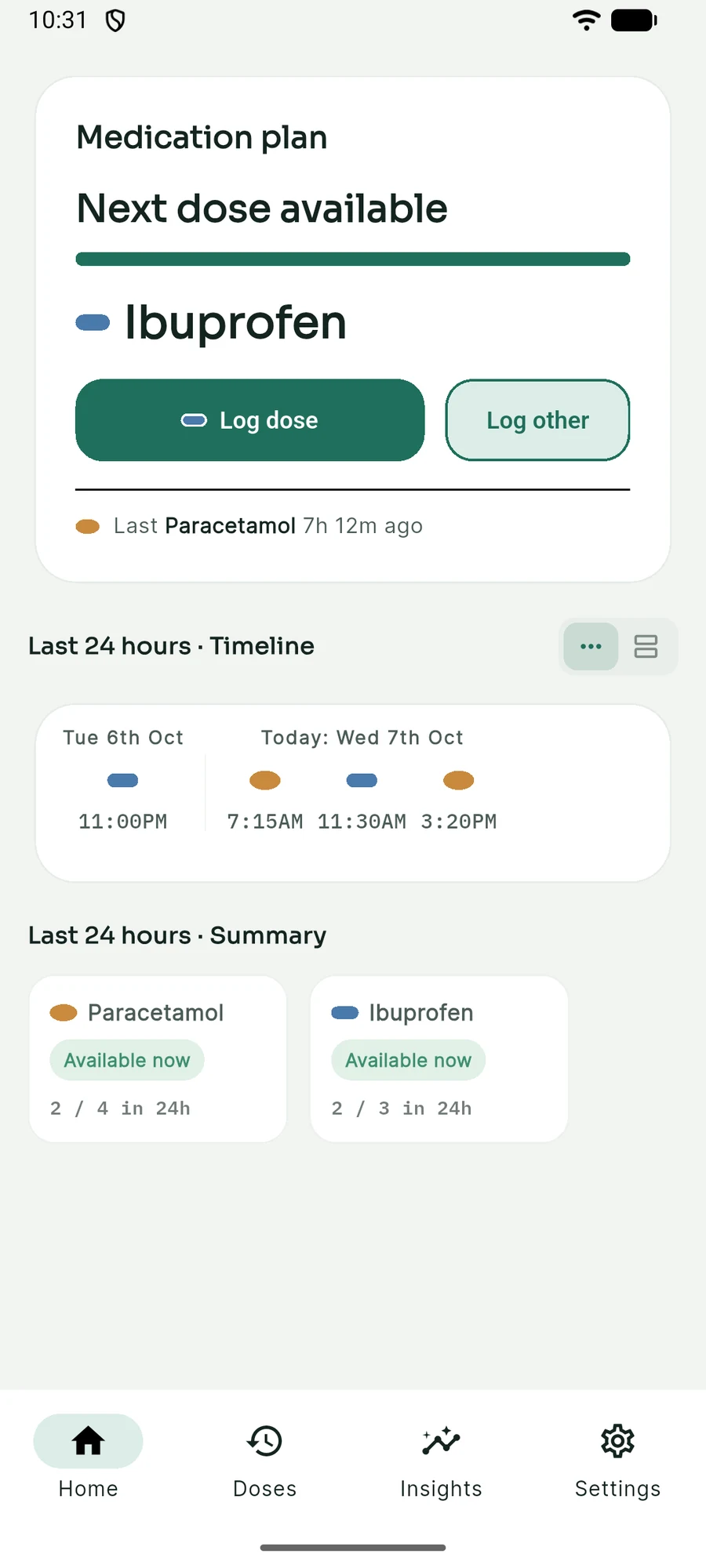
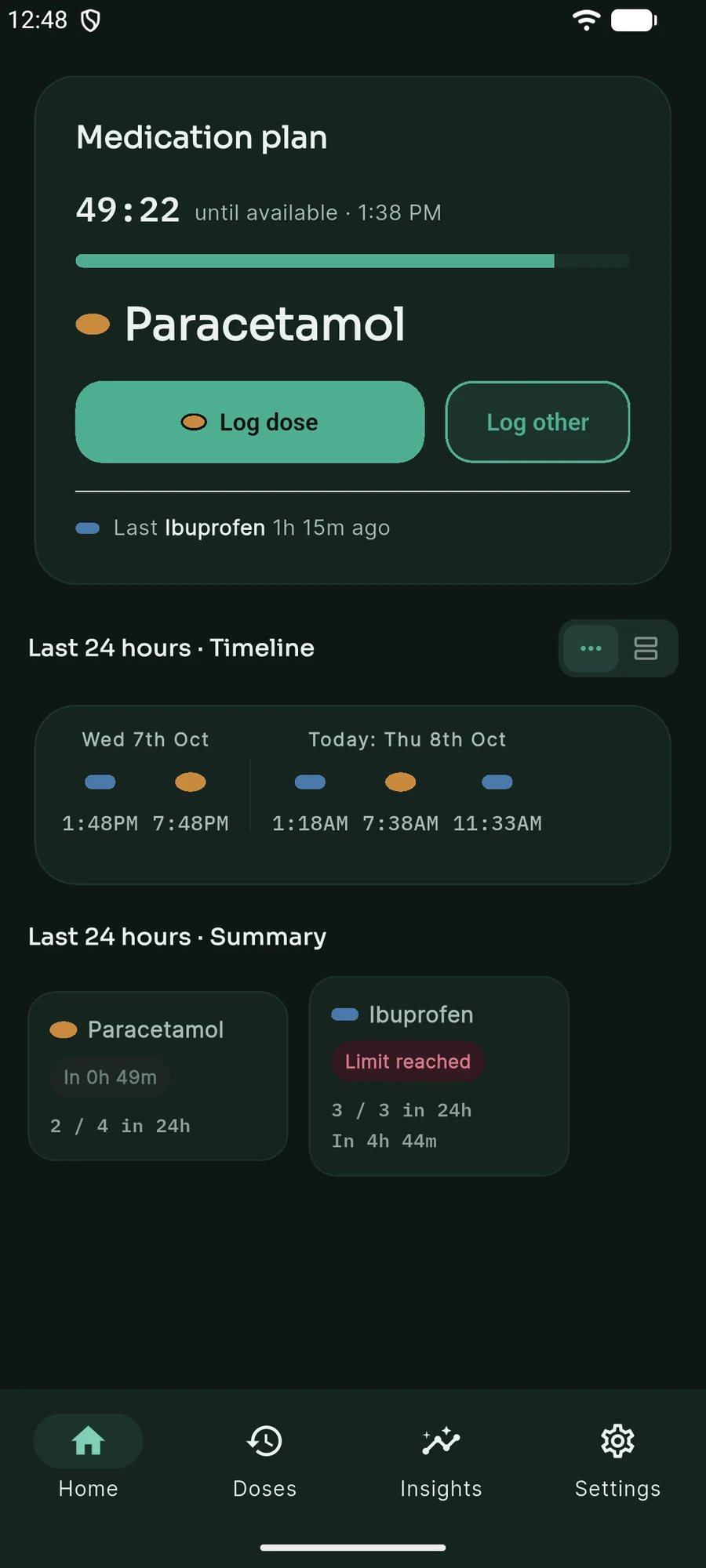
Log a dose and KinPace shows when your next dose is available. One medication or several. For you, or someone you look after.
Not yet published. This page previews what's on the way.
It follows the limits you set. It doesn't decide what's safe for you, so always follow your doctor's or pharmacist's advice.
KinPace at a glance
- What it is
- A rolling 24-hour windowA medication and dose tracker that counts from your last dose.
- Best for
- Alternating, or just oneMedication where the timing follows your symptoms.
- Limits
- The limits you setFollows each medication's minimum interval and its maximum doses per 24 hours.
- Reports
- Insights and exportA full dose history, with PDF and CSV export.
- Privacy
- On your deviceNo accountNo cloud sync
- Platform and status
- AndroidNot yet publishedPrice TBA
Is this app right for you?
KinPace is designed for situations where medication timing responds to symptoms, rather than following a simple fixed routine.
Alternating medications
I manage a chronic condition and alternate between medications to stay ahead of my symptoms, like pain.
One medication
I take a single medication and want a clear record of my intervals and my rolling daily limit.
Caring for someone
My child is sick, and I need to know which dose is next and when it's available.
Recovering from surgery
I'm recovering from surgery and alternating between pain medications during rehab, so I want to see how long each one is actually lasting as I recover.
It's not for medication you take on a set daily routine regardless of symptoms — like a morning vitamin or a once-daily prescription. A simple reminder app suits that better.
Set it up once. Then log a dose when you need one.
One medication or several. Four steps, and the last two repeat every time.
-
1
Add your medications
Enter a name, the shortest wait between doses, and the most doses in 24 hours. Add one, or as many as you like.
-
2Optional
Choose the order
Alternating between medications? Put them in the order you take them. Just one? Skip this step.
-
3
Log a dose
Take your medication, then tap to log it. Log other medications too, even if they're not in your plan.
-
4
See when it's available
Home counts down to your next dose, and shows when it's available, using the limits you set.
It follows the limits you set. It doesn't decide what's safe for you.
On the roadmap
These features aren't built yet — they're planned next.
Family mode
Manage symptoms and doses for one or more family members — built for situations where someone in the household is sick and you're responding to symptoms as they come.
Home-screen widget
See what's next directly from your home screen, without needing to open the app.
Questions, answered honestly.
Getting started
What is KinPace?
KinPace is an Android app for tracking medication you take when you need it, on a rolling 24-hour window. You add your medications, set each one's minimum interval and maximum doses per 24 hours, build a plan, and log each dose with one tap. The app then shows which medication is next and when it's available.
Who is KinPace for?
It's for situations where medication timing responds to symptoms rather than following a fixed routine: managing a chronic condition by alternating between medications, caring for a sick child, recovering from surgery, or simply keeping a clear record of one medication. It isn't designed for medication you take at the same time every day regardless of symptoms.
Can I use it for just one medication?
Yes. Add the one medication and the plan is a single step. You still get the next-dose countdown, the 24-hour limit, your full history, Insights and reports.
I already track my doses in a spreadsheet. What's different?
A spreadsheet records what you took. KinPace also works out what's next: it counts from your last dose, follows each medication's minimum interval and 24-hour maximum, and shows when the next dose is available. It keeps the same history and shows how long each dose lasted, and you can export it to CSV to open in a spreadsheet whenever you like.
How it works
What does "rolling 24-hour window" mean?
Instead of resetting at midnight or at a fixed time of day, KinPace counts back from now. Each dose you log starts the count for the next one, so what's due is always based on when you actually took your last dose.
How does the app decide which medication is next?
Home recommends whichever medication in your saved plan order is due soonest, based on each medication's own minimum interval and maximum doses per 24 hours. The plan repeats once it reaches the end, and a new order takes effect as soon as you save it.
What are the minimum interval and maximum doses per 24 hours?
They're the two limits you set for each medication when you add it: the shortest time to wait between doses, and the most doses allowed in any 24 hours. KinPace follows the limits you enter, so check them against your doctor's advice or the medication's packet or label before saving.
What about medications I only take sometimes?
Medications that aren't in your plan are treated as as-needed. Log them from Home with "Log other". They appear in your history and dose counts but are measured independently: they're never recommended by the plan, don't change what's next, and don't affect any plan dose's "Lasted" time.
History and insights
Can I fix a dose I logged at the wrong time?
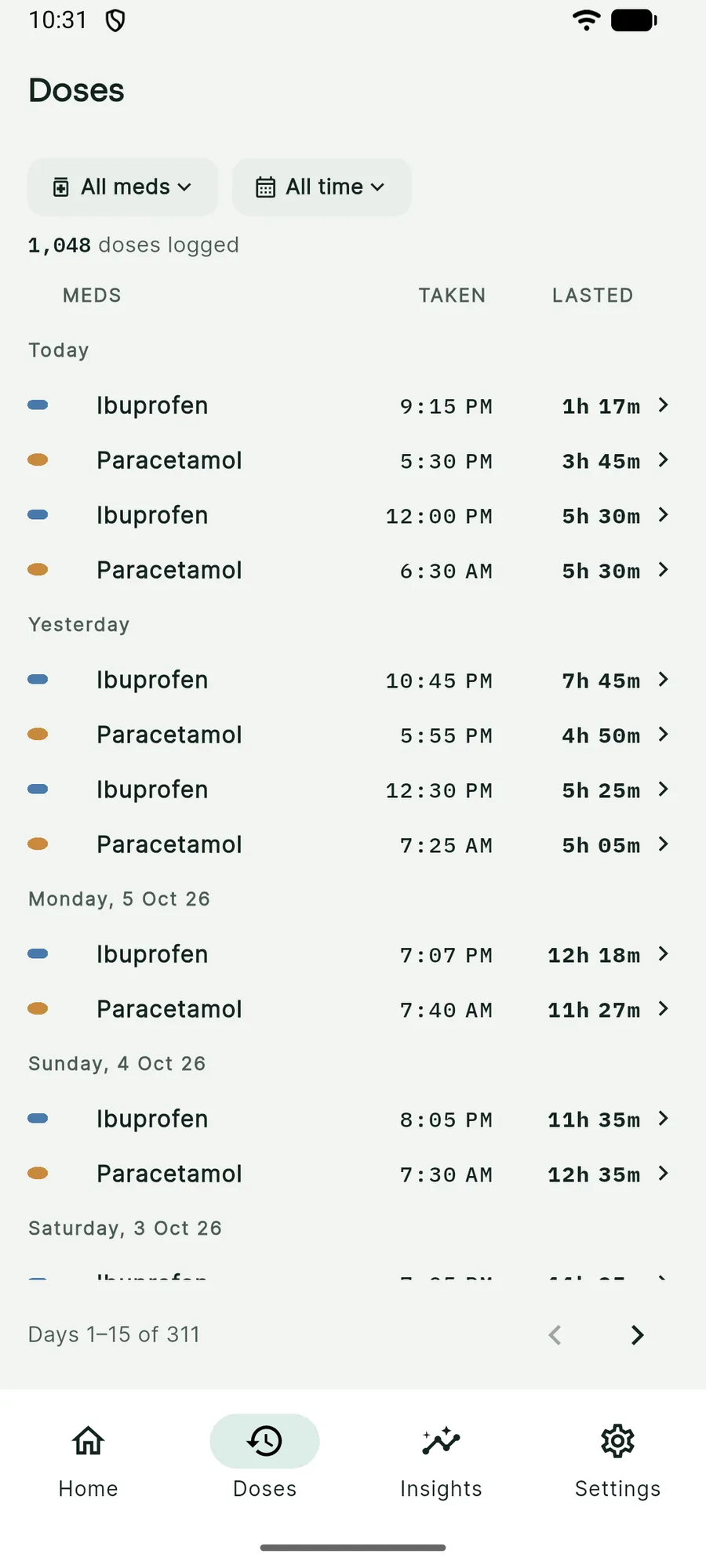
Yes. Any dose in your Doses list can have its taken-at time edited afterwards, so a late or mistyped entry isn't stuck.
What does "Lasted" mean?
Lasted is how long a plan dose went before the next plan dose was taken, which shows how long each dose covered you. Your most recent dose is still running, so it's shown live but left out of Insights averages until you log the next one.
What happens when there's a long gap between doses?
If you log a dose after a gap much longer than a medication's usual pattern, KinPace asks whether you didn't need it for a while, or a dose now lasts that long. If you skip the question, it stays in Doses as "Unusual gap" so you can answer later. Marking it as not needed leaves it out of Insights averages and trends, so one unusual stretch doesn't skew your numbers. You can change your answer later.
What can I see in Insights?
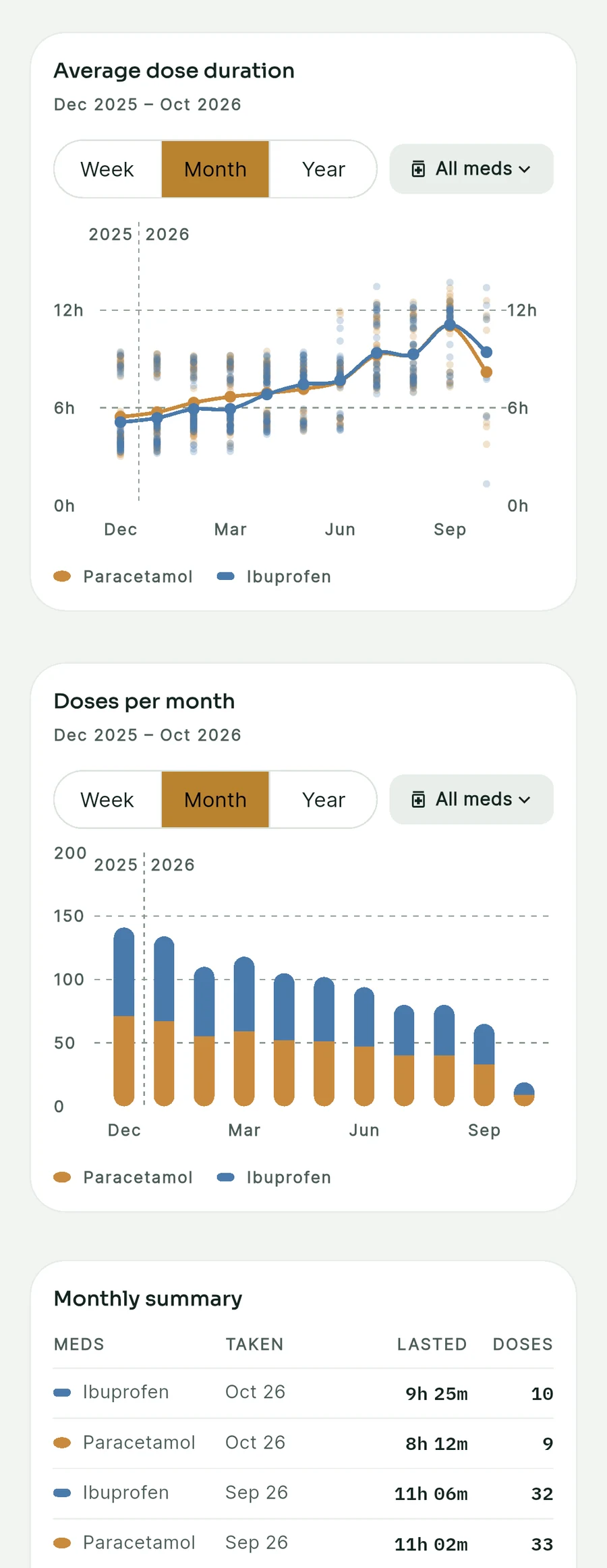
Insights shows total doses, days tracked, how often doses were on plan and your daily average; your progress since you started; average dose duration by week, month or year for each medication; doses per week, month or quarter; and a monthly summary. You can hide any visual you don't want.
Reports and your data
Can I share a report with my doctor?
Yes. Settings > Data > Export PDF report builds a printable report. Choose the Appointment summary, the Full log, or Custom to pick the sections (summary stats, progress, trend, daily pattern and dose log), then pick the last 30 days, 90 days or all time, and share it from your phone.
Can I export or import my data?
Yes. You can export your dose history as a CSV file for a spreadsheet, and import a CSV in the same layout back in. Importing skips doses that are already logged, so importing the same file twice is safe.
Where is my data stored?
Locally, on your own device. There's no account and no cloud sync, and the app doesn't connect to the internet, so it never sends your records anywhere. Your data only leaves your phone if you share an export or report, or if you have Android's own device backup turned on, which may include app data in your Google backup. The privacy policy has the details.
Safety and availability
Does it replace advice from my doctor or pharmacist?
No. KinPace tracks the schedule and limits you set up. It doesn't decide what's safe for you. Always follow your doctor's or pharmacist's advice on what and how much to take.
What platforms does it run on?
Android only for now. Other platforms haven't been announced.
How much will it cost?
Not decided or announced yet. That will be shared here as soon as it is.
Why I built KinPace
I spent five years alternating medications by hand for a long-term hip issue — logging every dose in a spreadsheet and tracking my progress on how much I was taking and how long each dose actually lasted me. KinPace is the tool I built so I'd never have to keep that spreadsheet again.
Take the guesswork out of medication tracking.
Keep your medication history clear, understand your intervals and see what comes next at a glance.
KinPace is coming soon